Build a complete launch film for Aster, a fictional assistant app. The finished composition introduces a new identity, demonstrates a school-email summary, carries a pet photograph through a mobile caption request, and introduces a more capable edition. It runs for 2,212 frames at 30000/1001 frames per second: 73.807 seconds at 1920 × 1080.
Inspired by: Google’s Gemini launch film. This tutorial studies its sequence, typography, changes of scale, and transitions. Aster, Muse, Robin, Pip, Maple Grove School, and the example interface are fictional. The downloadable project uses a native pointed flare, a four-color A monogram, and distinct editable app symbols. One pet photograph is a 448 × 286 crop from frame 1348 of the reference film; it restores the photographic texture used in this study and is credited in the project’s asset record. The camera, phone, desktop, text, and controls are rebuilt in React and SVG. No source video or soundtrack is included.
The worked project is silent. Follow the same production order when you adapt it: decide the sequence of ideas, build and review the visuals, then write any narration to those visuals. Add audio only after the important visual landings are stable.
The full film and the first three lesson sections are public. The complete lesson and editable source project are included in your one-time purchase of the 20cuts Creation System.
What you will make
The film begins with short phrases whose motion explains their meaning. Letters experiment, selected text gets written, scattered letters resolve a problem, and a cloud of ideas becomes one clear phrase. A page turns to reveal a product announcement. Muse becomes Aster. The identity leads into desktop UI, then one specific piece of work establishes what the app does.
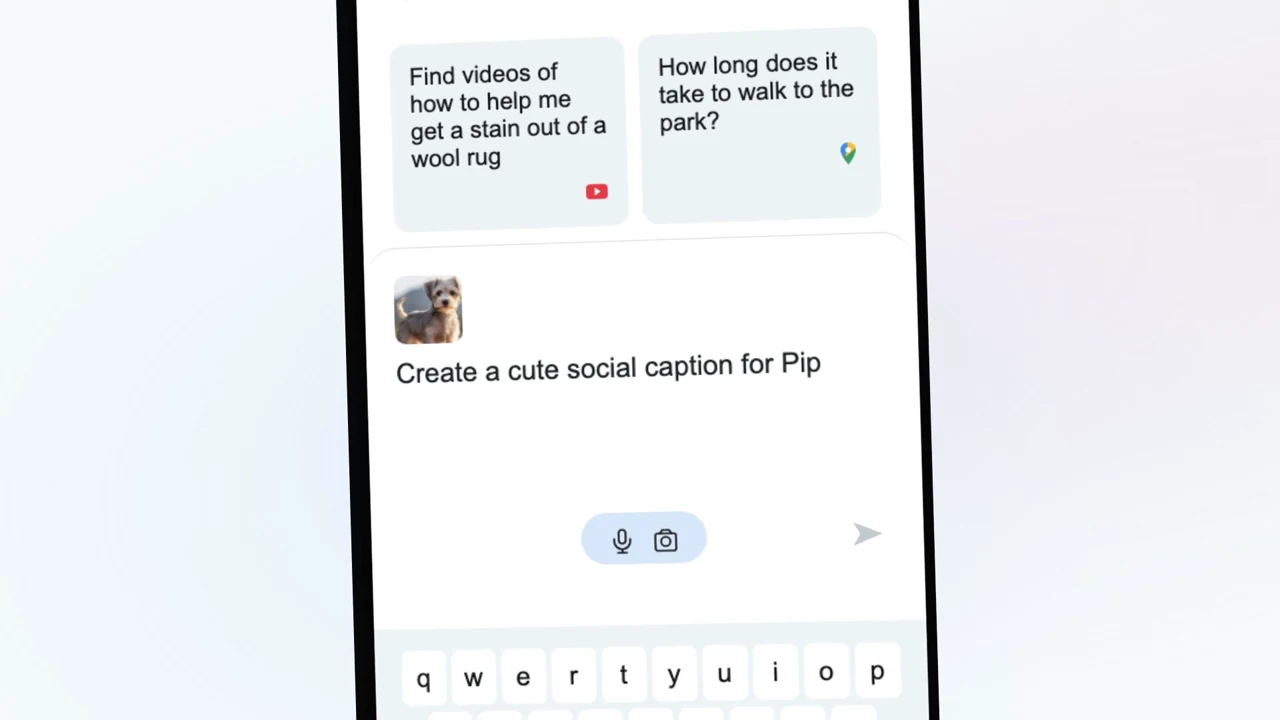
The second half follows a phone through a complete example. Pip’s photograph appears in a camera, becomes an attachment, becomes a prompt thumbnail, and stays visible above the caption response. A product-menu symbol then becomes the entrance to Aster Advanced. Four capability cards accumulate before the film closes on the desktop and mobile product together.
You will learn to separate camera movement from changes inside a surface, time words at exact frames, preserve one piece of content across interface states, build a particle-to-type transition, and inspect failures that a contact sheet can conceal.
Download and run the example
Download and unzip the Aster project attached to this lesson. You need a computer with Node.js 22 or later, npm, and enough free space for the installed packages and rendered video. The project includes React 19.2 and Remotion 4.0.488. You do not need an API key, a paid image service, or access to our production repository.
Open a terminal in the unzipped project folder and run:
npm install
npm run check
npm run dev
The first command installs the project’s dependencies. The second checks its TypeScript source. The third opens Remotion Studio. Select AsterLaunch, move the playhead to frame 0, and play the film once without pausing. Then render the complete MP4:
npm run render
The package’s render script writes the full silent film to its out folder. Keep the terminal open until encoding completes. A browser preview that works does not prove that the whole film can render; the complete export checks every frame.
The source files are organized around responsibilities:
| File inside the download | Responsibility |
|---|---|
src/videos/tutorial-aster/entry.tsx | Composition ID, dimensions, frame rate, and duration |
src/videos/tutorial-aster/Video.tsx | Whole-film sequence, cameras, animated typography, particles, and transitions |
src/videos/tutorial-aster/surfaces.tsx | Desktop, phone, keyboard, camera, response, native controls, and generic app symbols |
src/videos/tutorial-aster/identity.tsx | The shared pointed flare, four-color monogram, and distinct app symbols |
src/videos/tutorial-aster/photo.tsx | One photograph component shared by all phone states |
public/assets/tutorial-aster/pip-reference-photo.jpg | The credited pet photograph crop |
THIRD_PARTY_NOTICES.md | Source-image, software, and font credits |
src/videos/tutorial-aster/motion.ts | Timing helpers and the runtime frame/ledger audit |
src/videos/tutorial-aster/ledger.json | Every beat’s frame interval and implementation notes |
src/videos/tutorial-aster/source-times.json | The precise presentation clock preserved by this exercise |
src/videos/tutorial-aster/colors.ts | The shared color tokens |
src/videos/tutorial-aster/particle-targets.json | Preserved point data for the original Aster transition |
src/videos/tutorial-aster/wordmark.json | The current transition name, type settings and generated points |
src/videos/tutorial-aster/generate-wordmark.js | Local command that rebuilds the points for a different name |
Make a copy of the download before editing. Render the untouched project once. You now have a known starting point and a finished file to compare against your changes.
Read the full beat map before changing the film
Frame numbers below are zero-based and inclusive. The time shown is the start frame divided by 30000/1001. Adjacent rows account for every frame once; individual objects may begin or end on either side of a descriptive boundary. That overlap is intentional.
| Frames | Start | Beat |
|---|---|---|
| 0–60 | 0.000s | Experimenting |
| 61–83 | 2.035s | Muse |
| 84–120 | 2.803s | To becomes write |
| 121–155 | 4.037s | Write emails |
| 156–203 | 5.205s | Solve problems |
| 204–260 | 6.807s | Brainstorm depth field |
| 261–319 | 8.709s | And now |
| 320–370 | 10.677s | Next chapter page turn |
| 371–413 | 12.379s | Today Muse is becoming |
| 414–469 | 13.814s | Particle rebrand |
| 470–511 | 15.682s | Logo enters chrome |
| 512–620 | 17.084s | Desktop hello |
| 621–644 | 20.721s | Everything wall |
| 645–686 | 21.521s | Aster orbit |
| 687–728 | 22.923s | Email prompt |
| 729–798 | 24.324s | Email response |
| 799–852 | 26.660s | More stretches |
| 853–908 | 28.462s | New app |
| 909–944 | 30.330s | Phone home |
| 945–1025 | 31.532s | Phone introduction |
| 1026–1076 | 34.234s | Supercharge |
| 1077–1126 | 35.936s | Phone home and input |
| 1127–1159 | 37.604s | Photo camera |
| 1160–1178 | 38.705s | Photo attach |
| 1179–1289 | 39.339s | Caption request |
| 1290–1341 | 43.043s | Caption answer |
| 1342–1387 | 44.778s | Reaction orbit |
| 1388–1439 | 46.313s | Not all |
| 1440–1471 | 48.048s | Introducing |
| 1472–1518 | 49.116s | Advanced portal |
| 1519–1638 | 50.684s | Advanced UI reveal |
| 1639–1674 | 54.688s | Capable sparkle |
| 1675–1701 | 55.889s | Reasoning title |
| 1702–1736 | 56.790s | Reasoning card |
| 1737–1770 | 57.958s | Coding title |
| 1771–1811 | 59.092s | Coding card |
| 1812–1840 | 60.460s | And more title |
| 1841–1903 | 61.428s | Images and roleplay |
| 1904–1951 | 63.530s | Access bends into arc |
| 1952–1994 | 65.132s | Core circle |
| 1995–2093 | 66.567s | Experience end slate |
| 2094–2211 | 69.870s | Aster close |
Continue making Aster
The rest of the build is inside.
Get the complete walkthrough and editable source for this film, plus all 4 launch-film tutorials in the 20cuts Creation System. Pay $29.99 once, with a 30-day money-back guarantee.
Explore the complete system ↗