A worked example explains software by following one task from its starting conditions to a visible result. Keeping the same input recognizable across scenes lets the viewer understand why each feature appears.
A fictional deployment tool provides the example in this guide. Its queue, workers, and approval controls each contribute to a release, but an interface tour would leave their relationship unexplained.
The demonstration follows a checkout update through a failed check, a correction, and approval. The current release stays live until the corrected version passes and the reviewer approves that exact version.
Choose a task with a meaningful result
Write the example as a short situation: “A team has changed its checkout page. Tests must pass and a reviewer must approve the release before customers receive it.”
This example gives the film a destination. It also establishes boundaries. You can show one update, one failed check and one approval without explaining every supported integration or permission model.
Choose a task your intended viewer recognizes. A developer can follow a change entering a build queue. A business buyer might need the film to start with the delayed release and the people waiting for it. The product behavior can be the same while the opening context changes.
Use sample names and data deliberately. Label simulations where viewers could mistake them for measured results. A fictional build finishing in a few seconds demonstrates a sequence; it does not establish your product's speed.
Write the state changes before the scenes
List what must become true as the task progresses:
- The update enters the queue.
- A worker starts its checks.
- A failed check prevents release.
- A corrected version passes those checks.
- A reviewer approves the ready version.
- That version becomes the active release.
The list still needs the causes between those states. The developer must submit the corrected version, approval must apply to that version, and the release panel must identify which version customers receive during the failed run.
Record those transitions before animation so the film preserves the distinction between a failed candidate and the current live release.
Give the example a stable visual identity
Keep a short update name or version label visible as it moves through the queue, worker and release panel. The label helps the viewer understand that these are different views of the same job.
Use the real product's layout where the location of controls matters. If you introduce a simplified diagram, make its role clear and preserve the product's actual relationships. Do not show an approval control directly changing a release if the real system requires another step.
A continuous scene can keep the previous result available while the next event unfolds. For example, leave the failed run in the history list when the corrected run starts. The viewer can then compare the successful run with the failed one. You do not need to reset the frame to a blank slide after every point.
Reveal complexity when it answers a question
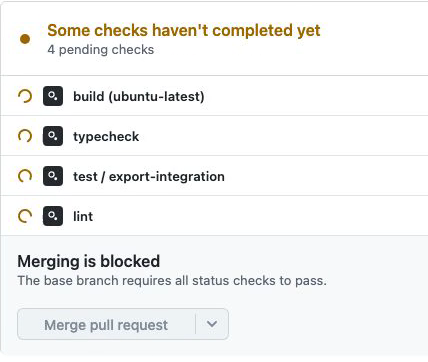
The viewer first needs to understand that checks control whether the update can proceed. They do not need every log line at that moment. After the failure, a closer view of the specific failing check answers the natural next question: what stopped it?
This gives the camera a job. It moves toward information when the story creates a reason to inspect that information. It can then return to the larger system before the release changes.
Avoid animating all panels simply because the interface can do so. A moving queue, expanding log, flashing notification and approval dialog compete if each demands attention at once. Sequence them around the task.
Write narration that joins the steps
Once the visual sequence works, use narration to explain the relationship between states. “The check fails, so the current release stays live” connects the error to its consequence. “Powerful checks ensure seamless deployment” adds less because it does not identify what happened.
Keep the language specific enough to audit. Which check failed? Which version is current? Who approves the release? Remove details the picture cannot support, and add a visual when a necessary detail has no representation.
Then align each important phrase to the event it explains. The new version should not appear live well before the narration says that approval is required.
Turn the example into a reusable planning prompt
Explain this product through one realistic task.
Audience and prior knowledge:
Task and desired result:
Real product behavior we can demonstrate:

Propose a sequence of visible state changes. Carry one named
example through the sequence. For each change, state its cause,
the evidence the viewer sees, and what they now understand.
Flag missing product facts. Do not invent capabilities, results,
or customer data. End by resolving the opening task.
Compare the proposed sequence with a recording of the actual workflow before storyboarding it. A fluent explanation can still conceal an impossible interaction.
Before production, confirm that the example has a recognizable starting point, a meaningful decision, a visible result and a truthful path between them. Then convert it into a storyboard. If the path is too large for one film, split it at a completed task so each video remains useful on its own.
A worked-example exercise
Prepare a release example with stable version identifiers. Version 2.3 is live; version 2.4 fails a checkout test; the developer submits corrected version 2.4.1; the reviewer approves 2.4.1 after its checks pass. Keep 2.3 visible as the live version until the final release action.
Produce a state table with a row for each transition. Each row needs the candidate version, current live version, actor, action, and resulting status. Attach the product evidence for the real workflow you intend to show. A test environment should supply the behavior; the sample identifiers only make it easier to follow.
The table passes when a colleague can answer which version customers receive at every step, what prevents the failed candidate from releasing, and which exact version the reviewer approves. If they confuse the failed run with the live release, keep both identifiers visible and revise the transition that lost them.